01 Nov 2007

Silverlight 1.1 TreeView and Animated Wrap Panel Controls with Source Code


Over the past couple nights, I've had a few hours to work on a wallpaper viewer for my site.

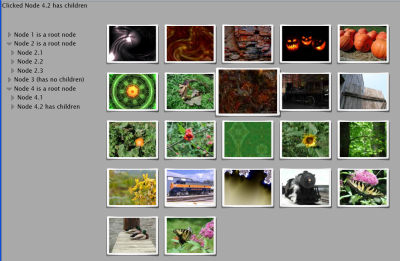
As part of that development, I need a panel that I can use to display image thumbnails. For grins, I also decided to build a very simple treeview. While each is a partially complete (and non-optimized) work-in-progress, I think the code has reached a state where it could be useful to others.

The treeview has the ability to display any arbitrary FrameworkElement (such as your own usercontrol), or straight text, on a node-by-node basis. The code in the treeview shows, among other things, a custom observable collection.

The wrap panel uses a simple animation to shuffle around various FrameworkElements (a custom image button, in this case). Currently only the horizontal works, but vertical is easy enough to implement. The code for the wrap panel shows how to create an observable collection that wraps a canvas's Children collection, as well as how to use some basic extension methods. The images are included in the download (they are thumbnails from my wallpaper site) and are currently hard-coded, so you can run the whole thing from your own machine. Resize the browser window to see the panel in action.
You can view the live demo here.

Neither control currently support scrolling. That's going to come soon, if Microsoft doesn't beat me to the punch :)

More design/construction details coming soon. In the mean time, please feel free to download the work-in-progress code here.

[ NOTE: Everything here is based on the Silverlight 1.1 Alpha September Refresh. If you come to this blog post after subsequent releases of Silverlight, the demo will likely not work, as I expect significant changes in the control model. Take a look at the latest blog entries to see what updates or suggestions I have ]

[Update: New Source code and updates available here.]


Share |
posted by Pete Brown on Thursday, November 01, 2007
filed under:    

14 comments for “Silverlight 1.1 TreeView and Animated Wrap Panel Controls with Source Code”

  1. VStoychevsays:
    Hi Pete, the demo looks very good, but I receive a 404 not found error when try to download the source code.
  2. Pete Brownsays:
    All set. For some reason, the server wouldn't serve the file up until I removed the space from the name - not even when I encoded the space.

    Odd.

    Anyway, you can download it now.

    Pete
  3. MrCypromsays:
    Hi, Pete.

    Your controls are super. I need to know if you have a final version of them because I want to integrate them in my SL application.

    Regards.
  4. Pete Brownsays:
    My MrCyprom

    I've waited to update them until I see the next alpha/beta of Siliverlight. If you're interested, though, I'll make an effort to get them wrapped up before then. No promises :)

    Pete
  5. MrCypromsays:
    Ok thank you very much.
  6. Chad Campbellsays:
    Hi Pete,

    I happen to stumble upon this today and I have to say, nice work. I really liked the animation effect you used when the browser window is resized. The way the images reposition is really nice.
  7. MrCypromsays:
    Hi,

    I am trying to use your WrapPanel with my Controls but it fails. With debug I can see that in the UpdateLayout funtion when the storyboard begins the iteration stops. So I think it's a problem with it.
    Does my Controls need to be specific for being used with your WrapPAnel ?
    Regards.
  8. Pete Brownsays:
    Since I am creating an animation in xaml (the only way to do it in code right now), any controls you add must have a name. If the control doesn't have a name set with testEllipse.SetValue(FrameworkElement.NameProperty, "testEllipse"); or similar, you will get a Catastrophic Failure.

    I'm going to try to make some updates to the control set later today and post those.

    FWIW, I tested it by putting this code in Page_Load between the foreach and the thumbnails.ResumeLayout() call:

    // this is there just to show that you can add any other control to this as well
    Ellipse testEllipse = new Ellipse();
    testEllipse.Width = 200;
    testEllipse.Height = 200;
    testEllipse.StrokeThickness = 5;
    testEllipse.Stroke = new SolidColorBrush(Colors.White);
    testEllipse.SetValue(FrameworkElement.NameProperty, "testEllipse");
    thumbnails.Children.Add(testEllipse);
  9. MrCypromsays:
    Yes, it works. I'll check for your release.

    Regards.
  10. pushpendra says:
    <p>hi Pete,i want to know about silverlight sapphire tree controles....</p>
  11. Pete Brownsays:
    Hi pushpendra

    I haven't used the sapphire controls yet, but they definitely looked promising!

    Pete
  12. Michaelsays:
    Peter,
    Could you please confirm whether VisualCollection is missing in Silverlight V2 beta ?

    Can't compile
    public class PanelChildrenCollection : IList<Visual>
    {
    private VisualCollection _associatedCollection;

    Intellisense doesn't show VisualCollection under System.Windows.Media and I failed to reference it anywhere else. If so, any substitute you may think of ?
    TIA
    Michael
  13. Azharsays:
    i am not able to see demo,one image display for silver light license agreement.
  14. Pete Brownsays:
    @Azhar

    The code and sample on this page was written for Silverlight 1.1. I have not yet updated it for Silverlight 2 Beta 2 or RTM, so it won't run on current bits, and the source code will be very different.

    Pete

Comment on this Post

Remember me

7 trackbacks for “Silverlight 1.1 TreeView and Animated Wrap Panel Controls with Source Code”

  1. Public Sector Developer Weblogsays:
    If you haven't been paying attention to Pete Brown's blog, then you are missing out. Pete continues to
  2. Noticias externassays:
    If you haven't been paying attention to Pete Brown's blog, then you are missing out. Pete continues
  3. Christopher Steensays:
    Link Listing - November 1, 2007
  4. Christopher Steensays:
    ASP.NET Dangers of the new ASP.NET MVC framework [Via: Mads Kristensen ] Link Blogs Links from the...
  5. WynApsesays:
    Silverlight Cream for November 2, 2007 -- #116
  6. Community Blogssays:
    I've been jammed up the last couple days, so this Cream is only ones submitted to me, later I'll
  7. POKE 53280,0: Pete Brown's Blogsays:
    I made some updates to the panel and treeview controls described in this post . Changed the name from